Losing a company laptop, smartphone or tablet can create a serious data-security risk. A device may contain emails, customer information, business documents, passwords, financial records and other confidential data.
This is where remote wipe becomes useful.
But what is a remote wipe, how does it work and is it the same as secure data destruction?
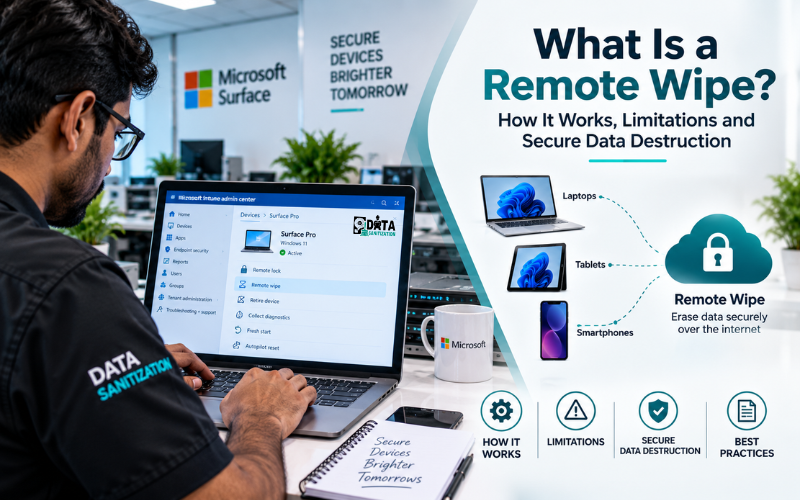
A remote wipe allows an authorised user or IT administrator to send a command to a managed device and erase data without physically handling it. It is commonly used with mobile device management (MDM) and enterprise security platforms.
Remote wiping is useful for lost, stolen and remotely managed devices. However, it should not automatically be treated as the same thing as professional data sanitization or certified data destruction.
When a device reaches the end of its useful life organisations may need a separate process for securely sanitizing the storage media and documenting its final disposition.
Quick Answer: What Is a Remote Wipe?
A remote wipe is a security feature that allows an authorised administrator or device owner to remotely erase data from a device.
The command is normally sent through an internet connection, MDM platform, UEM system or endpoint-management service.
Depending on the device and platform, a remote wipe may:
- Remove user data
- Delete company information
- Remove applications and settings
- Reset the device
- Wipe a managed work profile
- Protect information on a lost or stolen device
For example, Microsoft Intune provides a Wipe action for supported devices that can remove data and settings as part of the configured device-management process.
The important point is:
Remote wipe is primarily a device-security and management control.
It is not automatically a replacement for end-of-life media sanitization.
How Does Remote Wipe Work?
The basic process is simple.
1. The Device Is Lost or Stolen
An employee reports that a company laptop, phone or tablet is missing.
2. IT Identifies the Device
The administrator finds the device in the organisation’s MDM, UEM or endpoint-management platform.
3. The Wipe Command Is Sent
The administrator selects the appropriate remote data wipe action.
4. The Device Receives the Command
The device needs to communicate with the management service.
5. The Wipe Is Performed
The device carries out the configured erase action.
The exact result depends on the operating system, device configuration, management platform, storage technology and selected wipe option.
This is why organisations should check the status of a remote wipe rather than simply assuming that sending the command means the process is complete.
Why Do Businesses Use Remote Wipe?
Lost or Stolen Devices
A lost laptop can expose sensitive company information.
A remote laptop wipe allows IT teams to respond quickly without waiting for the physical device to be recovered.
Employee Offboarding
When an employee leaves, an organisation may need to remove company information from a managed device.
The exact approach depends on the platform and company policy.
BYOD Devices
Bring-your-own-device environments require additional care because personal and company information may exist on the same smartphone.
Where supported organisations can use selective wiping or work-profile management to remove business information without unnecessarily removing personal data.
Security Incidents
Remote wiping can also form part of an incident-response plan when a device is considered at risk.
Remote Wipe vs Remote Lock
A remote lock and remote wipe are not the same.
Remote Lock: Restricts access to the device while the organisation may still try to recover it.
Remote Wipe: Sends an instruction intended to erase data from the device.
For some incidents, IT may first lock a device and then wipe it if the risk becomes higher.
The correct action depends on the organisation’s security policy and the situation.
What Are the Main Remote Wipe Limitations?
The biggest limitation of remote wipe software is connectivity.
A remote wipe generally requires the device to communicate with the management service.
Problems can occur when a device is:
- Turned off
- Disconnected from the internet
- In airplane mode
- Unable to contact the management platform
- Otherwise unreachable
In these situations, the wipe command may not execute immediately.
This creates an important difference:
Sending a remote wipe command is not the same as confirming that the device has completed the wipe.
Other factors can also affect the result, including operating system, encryption, device configuration, storage technology, MDM platform and wipe settings.
Does Remote Wipe Permanently Destroy Data?
It depends on the device and the configured wipe process.
A remote wipe can be an important security control, but organisations should not assume that every remote wipe provides the same level of sanitization assurance for every device.
The result can depend on:
- Device type
- Operating system
- Storage technology
- Encryption
- Management platform
- Wipe configuration
- Device connectivity
- Successful command delivery
- Completion status
- Verification capability
For this reason, remote data erasure should be considered one part of a wider data-security strategy.
Remote Wipe vs Data Sanitization
The difference becomes especially important when equipment reaches the end of its lifecycle.
Remote Wipe | Professional Data Sanitization |
Usually performed remotely | Controlled sanitization process |
Useful for lost or stolen devices | Useful for end-of-life IT assets |
Depends on device connectivity | Can be performed under controlled physical custody |
Managed through software | Uses an appropriate media-specific method |
Focuses on immediate risk reduction | Focuses on secure media disposition |
May provide management records | Can provide asset-level reporting |
Physical device may remain outside company control | Physical media can be controlled during processing |
These processes solve different problems.
Remote wipe protects data when a managed device is missing or needs to be remotely cleared.
Data sanitization addresses the storage media when equipment is retired, transferred, recycled or destroyed.
For end-of-life equipment, our data sanitization services can support controlled media wiping and destruction.
Why Remote Wipe Is Not Enough for End-of-Life Devices
Imagine a company has 200 old laptops.
The IT team sends a remote wipe command before giving them to a recycler.
The organisation still needs to know:
- Did every device receive the command?
- Did every wipe complete?
- Were any devices offline?
- Which storage technology does each device use?
- Were failed wipes identified?
- What happened to the physical devices?
- Can the organisation prove how each asset was processed?
This is why a proper data sanitization process should be considered separately from remote device management.
A stronger workflow is:
Asset Identification → Sanitization → Verification → Documentation → Final Disposition
Our IT asset disposal services can support organisations managing retired IT equipment.
Remote Wipe and NIST SP 800-88
Organisations developing a media-sanitization programme can refer to NIST SP 800-88 Rev. 2, the current revision of NIST’s media-sanitization guidance.
NIST describes media sanitization as a process intended to make access to target data infeasible for a given level of effort.
NIST guidance is broader than simply sending a remote wipe command. A complete sanitization programme considers the media, information sensitivity, sanitization method, verification, controls and final disposition.
Read our NIST 800-88 data destruction standards guide for a detailed explanation.
Remote Wipe for Laptops and Phones
A remote laptop wipe is particularly useful for organisations with remote employees.
A typical process may look like:
Laptop lost → IT identifies device → Remote lock/wipe → Device connects → Command executes → IT checks status
Remote wiping is also widely used for smartphones.
For company-owned phones, an organisation may be able to wipe the entire device.
For BYOD devices, selective business-data removal may be more appropriate where supported.
This distinction helps organisations protect company information while reducing unnecessary impact on personal data.
When Should You Use Remote Wipe?
Use Remote Wipe When:
- A device is lost.
- A device is stolen.
- Employees work remotely.
- Immediate data protection is required.
- The device is managed through MDM or UEM.
- Corporate data needs to be removed remotely.
Use Professional Data Sanitization When:
- Devices are being retired.
- Hardware is being recycled.
- Equipment is being resold.
- Storage media is leaving company control.
- Asset-level documentation is required.
- Verification is required.
- A device cannot be reliably wiped remotely.
For many organisations, the strongest approach is:
Remote wipe for immediate protection + professional data sanitization for end-of-life assets.
Data Sanitization Pro for Enterprise Data Wiping
For organisations processing large numbers of storage devices, dedicated data wiping software can make the sanitization workflow more structured.
Data Sanitization Pro is a Made in India data sanitization software platform designed for enterprise, government, healthcare, defence and ITAD environments.
Its documented capabilities include HDD and SSD sanitization, NVMe and removable-media support, simultaneous multi-device sanitization, verification, real-time monitoring, device information, audit trails and PDF/HTML reporting.
These capabilities can help organisations manage data wiping, verification, asset information and reporting through a more structured process.
Learn more about Data Sanitization Pro.
Common Remote Wipe Mistakes
1. Assuming the Command Worked
Sending the command does not automatically confirm successful completion.
2. Ignoring Offline Devices
An offline device may not receive the command.
3. Using Remote Wipe for Every Situation
Remote wipe is valuable for security incidents but should not automatically replace end-of-life media sanitization.
4. Forgetting Physical Asset Disposal
After wiping, the organisation still needs to control the physical device.
5. Not Tracking Failed Wipes
Failed, pending and offline devices should be identified and handled separately.
6. Treating All Storage the Same
HDDs, SSDs and other storage technologies may require different sanitization methods.
Our HDD data sanitization services and SSD data sanitization services provide solutions for different storage technologies.
Enterprise Remote Wipe Checklist
A practical remote-wipe policy should include:
- Maintain an accurate device inventory.
- Enrol company devices in MDM/UEM.
- Enable remote lock and wipe.
- Define lost-device procedures.
- Train employees to report lost devices quickly.
- Track wipe status.
- Identify offline and failed devices.
- Establish an end-of-life sanitization process.
- Track storage media individually.
- Verify sanitization where required.
- Maintain appropriate records.
- Control final reuse, recycling or destruction.
For larger infrastructure projects, our data center decommissioning guide explains how secure data handling can fit into wider equipment retirement.
Professional Data Sanitization After Remote Wiping
Remote wipe is useful while a device is under management.
When the device reaches the end of its lifecycle organisations need a controlled process for storage media and physical asset handling.
Data Sanitization provides:
- HDD data wiping
- SSD data sanitization
- Laptop data wiping
- Server data sanitization
- Flash storage sanitization
- Mobile device data wiping
- Onsite data sanitization
- Offsite data destruction
- Asset tracking
- Verification and reporting
- Certificate of Destruction
- IT asset disposal
The objective is simple:
Protect data while the device is in use. Sanitize the media before the device leaves your control.
Conclusion
What is a remote wipe? It is a security feature that allows an authorised user or administrator to remotely send an erase command to a managed device.
It is useful for lost laptops, stolen devices, smartphones, employee offboarding, BYOD environments and enterprise device management.
However, remote wipe has limitations. A device generally needs to communicate with the management platform before it can receive the command and organisations need to confirm the result rather than simply assume the wipe was completed.
When physical IT assets reach the end of their lifecycle, data sanitization and secure data destruction become a separate requirement.
A practical strategy is:
Lost or stolen → Remote lock/wipe
Recovered → Assess and manage
End-of-life → Secure media sanitization
Final disposition → Reuse, resell, recycle or destroy
For professional data sanitization services for HDDs, SSDs, laptops, servers and other storage devices, contact Data Sanitization.
Phone: +91-852-770-9690
Email: support@datasanitization.in
Website: https://datasanitization.in/
Frequently Asked Questions
What is a remote wipe?
A remote wipe is a security feature that allows an authorised administrator to remotely send a command to erase data from a managed device.
How does remote wipe work?
An administrator sends a wipe command through an MDM, UEM or endpoint-management platform. The device receives the command and performs the configured action.
Does remote wipe work when a device is offline?
Generally, the device needs connectivity to receive the remote command. An offline device may not receive or execute the command until it can communicate with the management service.
Is remote wipe the same as data destruction?
No. Remote wipe is mainly a remote device-security control. Professional data sanitization is a broader process for securely handling storage media during device retirement and final disposition.
Is remote wipe permanent?
The result depends on the device, operating system, storage technology, configuration and wipe method. Organisations should confirm successful completion rather than assuming that sending the command is enough.
What is MDM remote wipe?
MDM remote wipe is a remote erase action performed through a mobile device management platform.
Can companies remotely wipe employee devices?
Yes, where the device, platform organisation policy and applicable permissions support it. BYOD environments require additional care because personal and business data may coexist.
Should I use remote wipe before recycling a laptop?
Remote wipe can provide an additional security measure, but organisations should also have an appropriate end-of-life media-sanitization process before equipment is recycled or disposed of.
Need Onsite Data Sanitization Services?
Do you want Data Sanitization Services to be provided at your location? No worries!! We got it covered. Our team members will be appointed to finish the job at your location after you book the appointment with us. Please feel free to contact us.